
I bought my Kenwood TH-F7E in 2004 for use when I was working away from home most of the time. It can receive through its twin receivers simultaneously and transmits FM on 2m and 70cm at up to 5w. It has broadband receive covering Hz to GHz in WFM, FM, SSB, CW and AM so its great to listen both to broadcast radio and SSB. I lashed up an aerial using the TV coax braid in my hotel room back in 2004. It has given great service and, although I don’t use it regularly, it has run the Halifax and District ARS net on two occasions when my base station had problems. For that, I ran it into my 2m linear and it worked pretty well.
With a seafaring holiday planned for 2024 at some point I decided to load up lots of useful frequencies into its 400 memories. I downloaded Kenwood’s software from Kenwood’s dusty archives – look for MFX101 or MCP-F6F7. https://www.kenwood.com/i/products/info/amateur/thf7e_f6a_soft.html
I found on Windows 11 I quickly ran into problems. I had to run the program in Windows 7 compatibility mode and the port looked like this below…
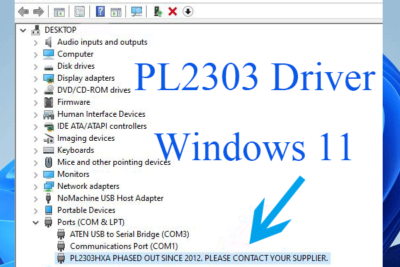
The Chirp site has a good explanation:- https://chirpmyradio.com/projects/chirp/wiki/ProlificDriverDeprecation
I downloaded the 2007 driver from the Miklor site on the above page and installed it.
I also disabled Windows automatically updating the drive using this guide:- https://www.howtogeek.com/263851/how-to-prevent-windows-from-automatically-updating-specific-drivers/
It installed okay but then I needed (in Devices > Ports) to uninstall the nasty serial driver and download and install the “PL2303_Prolific_DriverInstaller” driver which worked great. It gave me COM port 4 so that needed entering in the program under Radio > Port Select
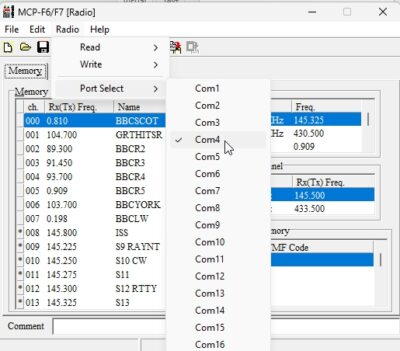
I tried the Chirp software and that works of a sort but I found it buggy; it wiped some of my memories, converted Tone to TSQL for some repeaters and wouldn’t load all of my memories. I suspect its TH-F7 configuration (which was hidden) needs a bit of work but my radio is now very old and probably unsupported. Thankfully I had downloaded the memories first using Kenwood’s software as that allowed me to upload them to the radio again and recover the problem.
Mass loading is a problem with MCP-F6F7 software. I edited the software’s fx file cloning memory channel rows being careful to copy tab characters and not replace with spaces; it was a long process! This is something Chirp should have done well if only it worked properly for me.

I’ve recently added a telescopic antenna to the rig’s accessories collection (a clone of a Diamond RH770). It is stated as 10w max power out for 2m/70cm (3dB/5dB gain) and SWR < 1.5.
SWR?
I tested it on my MFJ and found it was resonating a little short at about 150MHz with SWR of 1.8 on 2m so I cobbled together a mod with what I had to hand. The croc clip and a bit of copper to extend the antenna slightly brought resonance down to 145MHz.
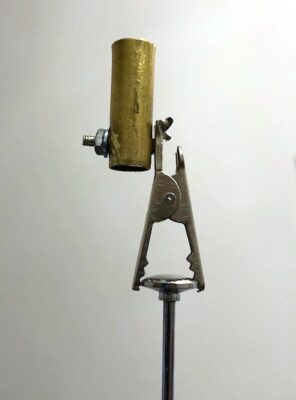
I tried to test SWR on 70cm but failed as my 70cm SWR meter has N-type connectors for my base station and I just didn’t have enough N-type SMA adaptors for the job.
I’m not certain its possible to accurately measure SWR for a 2m/70cm rubber duck or handheld antenna. In this scenario, the antenna is working as a loaded Marconi vertical. There is some ground plane provided by the radio itself and the operator holding it will be adding some capacitance. A SWR meter connected between the radio and antenna therefore isn’t showing a complete picture of what the PA transistor will see.
I did some receive tests into repeaters on low power 0.5w against the rubber duck antenna that came with the radio and pragmatically I think the receive tests might be as good as it gets for determining a useable SWR.
70cm: I found the antenna without croc clip worked well on 70cm bringing Hull repeater to S9 whereas it was S5 on the rubber duck.
2m: the antenna with croc clip seems to work best