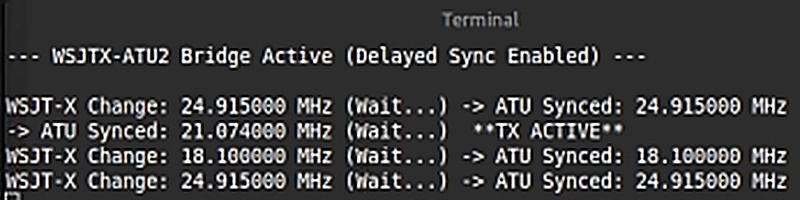
Controlling the Ciro Mazzoni ATU2 direct from a PC (using WSJT-X) isn’t very difficult although it isn’t well documented. I needed to do this because I’m using old gear, an FT-747GX in this case, which does have CAT but the ATU2 doesn’t handle stone age CAT!
This program (with the serial port changed appropriately) should work with other radios.
Bridging Program
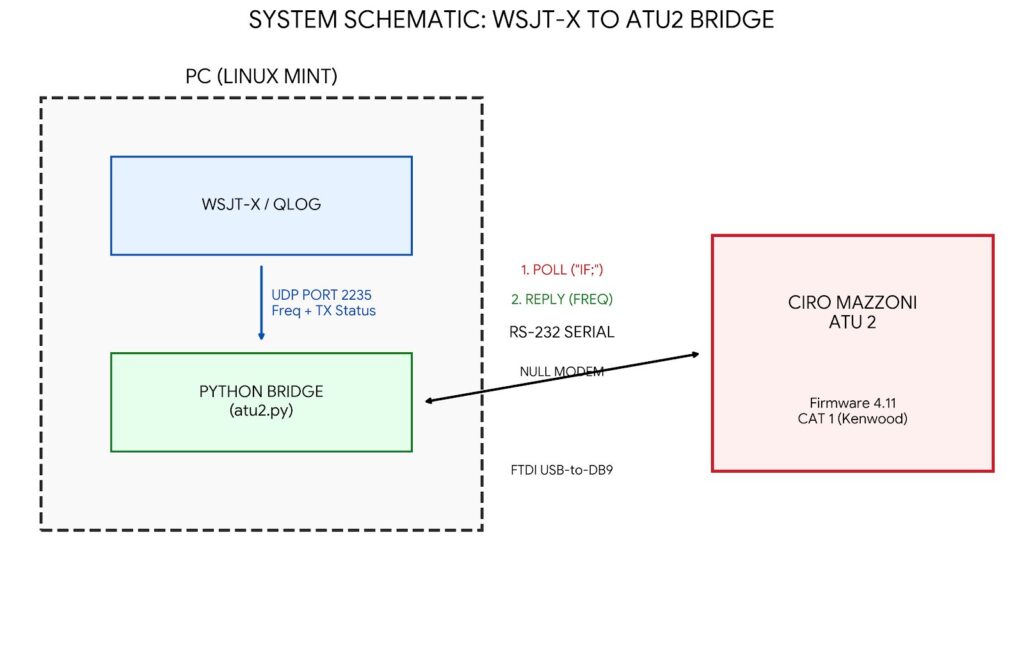
The program picks up the current frequency from WSJT-X, in my case via QLOG, and waits for ATU2 to ask for a status report. The game is to impersonate a radio and pass back to ATU2 the frequency from WSJT-X.
Initially the program starts with a frequency of 14.074MHz. This is in case ATU2 requests a frequency before WSJT-X sends a status message and could trigger a frequency change with ATU2 although it will quickly reset to WSJT-X.
The program is written in Python 3 and my scenario uses Linux Mint. I would expect this to work for other Linux Debian environments like Ubuntu and Raspbian. I can’t see why it shouldn’t work in Windows but you might have to change the imports. I just start up WSJT-X, QLOG and run in Terminal (aka CMD) something like: python3 /home/~blah~/atu2.py
Port Communications
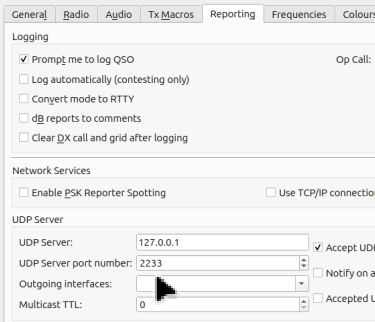
I’m running WSJT-X (actually WSJT-Z in my case but that isn’t important) and QLOG. WSJT-X by default sends on port 127.0.0.1:2237 unicast (in my case I changed this to 2233 but that isn’t important either)
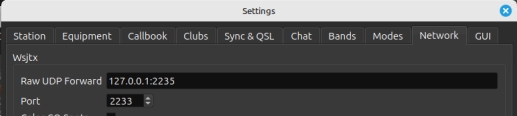
QLOG is listening to this and port forwarding on port 127.0.0.1:2235 (File > Settings > Network > Raw UDP Port Forwarding).
This should work with other configurations such as Gridtracker etc although I haven’t tried it. A Unicast message is a one-to-one scenario so you can’t just pick up the same port as your logger is using, you need some facility to forward the message to another port (QLog does this and most loggers do).
Serial Cable
I’m using port “by-id” to make the program independent of what other USB devices might get plugged in. The ATU2 has firmware 4.11 and is configured in FULL AUTO mode with CAT 1 (ie Kenwood protocol) 9600 baud. They are connected via a USB (with FTDI chip) – DB9 RS-232 null modem cable (I got mine from Startech.com and the quality is vital so don’t be tempted by the cheapest you can find and look at its FTDI chip spec). The program waits for frequency changes from WSJT-X and, as long as WSJT-X isn’t transmitting, it then waits for Ciro Mazzoni ATU2 to send a poll message “IF” to what it thinks is “the radio” (which it does every second). The program then responds with the new frequency. Various posts suggest the poll message is “AF” but I found in mode CAT 1 it is sending “IF”.
Updates:
1. I introduced a delay of one poll to sending the change to ATU2 as occasionally there was a comms processing clash with WSJT-X telling the radio through CAT and this program telling ATU2 the same.
2. The code below also includes a fix to stabilise the internal soundcard for my convenience – there is a block just before the # Setup UDP Socket comment if you want to remove it.
Python Script
# Author: David Brewerton (M0EZP) of Squirrelhouse Consulting
# Written: 01-MAR-2026
# Purpose: Control Ciro Mazzoni ATU2 from PC (WSJTX)
#
# My scenario uses Linux Mint running WSJTX and QLOG. WSJTX by default sends on
# port 127.0.0.1:2237 unicast. QLOG is listening to this and port forwarding on
# port 127.0.0.1:2235 (File > Settings > Network > Raw UDP Port Forwarding). This
# should work with other configurations of course.
#
# I'm using port by-id so it is independent of what other USB devices might get
# plugged in. The ATU2 has firmware 4.11 and is configured Set ATU2 to FULL AUTO
# mode CAT 1 (ie Kenwood protocol) 9600 baud. They are connected via a USB (with
# FTDI chip - DB9 RS-232 null modem cable (I got mine from Startech.com)
#
# This program waits for frequency changes from WSJTX and, as long as WSJTX isn't
# transmitting, it then waits for Ciro Mazzoni ATU2 to send a poll message "IF" to
# "the radio" (which it does every second) and responds with the new frequency.
#
# Version 08-MAR-2026 : set Default Audio Volume
# ---
import socket
import serial
import struct
import time

# --- Configuration ---
SERIAL_PORT = '/dev/serial/by-id/usb-FTDI_FT232R_USB_UART_A9J2VYFJ-if00-port0'
BAUD_RATE = 9600
UDP_IP = "127.0.0.1"
UDP_PORT = 2235

last_freq_hz = 14074000
pending_freq = None      # Stores the new freq while we wait
poll_count = 0           # Tracks how many "IF;" requests we've seen since the change
is_transmitting = False  # safety flag

def read_utf8_string(data, offset):
    """WSJT-X strings are prefixed with a 4-byte length."""
    length = struct.unpack(">I", data[offset:offset+4])[0]
    if length == 0xffffffff: # Handle null strings
        return "", offset + 4
    end = offset + 4 + length
    return data[offset+4:end].decode('utf-8', errors='ignore'), end

def parse_wsjtx_status(data):
    """Extracts frequency AND transmitting status."""
    try:
        # Skip ID string (offset 12)
        _, offset = read_utf8_string(data, 12)

        # Frequency (8 bytes)
        freq = struct.unpack(">Q", data[offset:offset+8])[0]
        offset += 8

        # Skip Mode, Report, DX Call, DX Grid (all strings)
        _, offset = read_utf8_string(data, offset) # Mode
        _, offset = read_utf8_string(data, offset) # Report
        _, offset = read_utf8_string(data, offset) # DX Call
        _, offset = read_utf8_string(data, offset) # DX Grid

        # Next is 'Transmitting' (1 byte boolean)
        transmitting = struct.unpack(">?", data[offset:offset+1])[0]

        return freq, transmitting
    except Exception as e:
        return None, False

def format_kenwood_if(freq_hz):
    """The exact format from your successful test.py"""
    freq_str = str(int(freq_hz)).zfill(11)
    return f"IF{freq_str}      +000000;".encode('ascii')

print("WSJTX-ATU2 Bridge with Audio Fix : M0EZP March 2026", flush=True)

### Start Set Default Audio Volume ###
# Nothing to do with ATU2 but this is a useful place to set it when starting WSJT-X
import subprocess

# Get current volume
result = subprocess.run(
    ["wpctl", "get-volume", "@DEFAULT_AUDIO_SINK@"],
    capture_output=True,
    text=True
)

output = result.stdout.strip()
print("Starting system volume:", output)

# Extract numeric value
current_volume = float(output.split()[1])

# Optional: adjust if different to target
target_volume = 0.50

if current_volume != target_volume:
    print("Adjusting volume to", target_volume)
    subprocess.run(["wpctl", "set-volume", "@DEFAULT_AUDIO_SINK@", str(target_volume)])
else:
    print("Volume already adequate")
### End Set Default Audio Volume ###

# Setup UDP Socket
sock = socket.socket(socket.AF_INET, socket.SOCK_DGRAM)
sock.bind((UDP_IP, UDP_PORT))
sock.setblocking(False)

try:
    with serial.Serial(SERIAL_PORT, BAUD_RATE, timeout=0.1) as ser:
        print("--- WSJTX-ATU2 Bridge Active (Delayed Sync Enabled) ---\n", flush=True)

        while True:
            # 1. Listen for Frequency Updates from WSJT-X
            try:
                data, addr = sock.recvfrom(2048)
                packet_type = struct.unpack(">I", data[8:12])[0]

                if packet_type == 1: # Status Packet
                    new_freq, transmitting = parse_wsjtx_status(data)

                    if transmitting != is_transmitting:
                        is_transmitting = transmitting
                        status = "TX ACTIVE" if is_transmitting else "RX READY "
                        print(f" **{status}**", end="\r", flush=True)

                    # If frequency changed and it's not what we last sent OR what is currently pending
                    if not is_transmitting and new_freq != last_freq_hz and new_freq != pending_freq:
                        pending_freq = new_freq
                        poll_count = 0
                        print(f"WSJT-X Change: {pending_freq/1e6:.6f} MHz (Wait...)", end=" ", flush=True)

            except (BlockingIOError, struct.error):
                pass
Result