I use a family ancestry service and often encounter transcriptions formatted as a table with lots of data items and values. I only want some of this detail and so I created a ‘parsing machine’ 🙂 to pull out the bits I want to keep and ignore the rest.
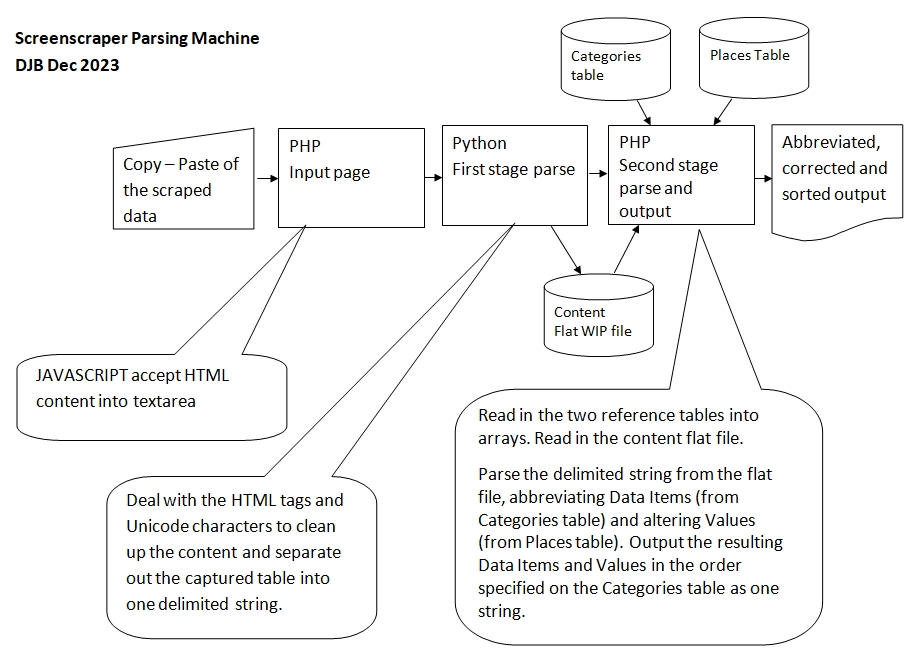
I decided to do the project as a skills test too so it could be more streamlined than I’ve created by writing everything in PHP but instead I’m collecting data in PHP, passing part parsed data to Python which then passes it back to PHP. The final step abbreviates Data Item text and corrects Place names; these are stored in a MySQL database.
Source data example
The items in blue are the only Data Items I want to collect. The items in red are ones I want to correct.
| First name(s) | William |
| Address | 49 Bolas Heath |
| Last name | Smith |
| Full address as transcribed | 49 Roles Heath, Wellington Salop |
| Sex | Male |
| Parish | Bolas Magna |
| Birth year | 1868 |
| Registration district | Wellington (Shropshire) |
| Census date | 19-Jun-21 |
| Registration district number | 355 |
| Age in years | 53 |
| Sub-district | Wellington (Shropshire) |
| Age in months | 5 |
| Sub-district number | 1 |
| Age as transcribed | 53 y 5 m |
| Enumeration district number | 18 |
| Relationship to head | Head |
| County | Shropshire |
| Marital status | Married |
| Country | England |
| Birth place | Shropshire, England |
| Parliamentary borough or division | Shropshire PC, The Wrekin Div. |
| Birth county | Shropshire |
| Archive | The National Archives |
| Birth country | England |
| Archive series | RG 15 |
| Birth place as transcribed | Bolas, Shropshire |
| Piece number | 12477 |
| Occupation | Forman Farm |
| Schedule number | 48 |
| Occupation code | 15 |
| District reference | RD 355 RS 1 ED 18, 19, 20, 21 |
| Occupation code with suffix | 015/6 |
| Schedule type code | E |
| Employer | Burlugh, J J Davies Esg |
| Schedule type | England household, single page, 10 entries |
| Employer code | 10 |
| Other household member’s first name(s) | Mary, Agnes, John |
| Place of work | Burleigh Farm, Willington Salop |
| Other household member’s last name | Smith |
| Number of minor dependants | 1 |
| Record set | 1921 Census Of England & Wales |
| Language used to complete form | English |
| Category | Census, land & surveys |
| Person making return | Wm Smith |
| Subcategory | Census |
| House number | 49 |
| Collections from | Great Britain, England |
| Street | Bolas Heath |
The data items I’m interested in are stored in a table called categories which holds string pairs of what the data item is called in the source data and what I want to abbreviate it to. Priority is the order I want the resulting items to be in.
- rowid int(11) auto_increment
- fromtext varchar(80) /* eg Place of work */
- totext varchar(20) /* eg. work */
- priority decimal(10,1) /* priority eg. 3.4 */
The values table is more or less a spelling corrector but can be used to change Greater Manchester to Lancashire for example.
- rowid int(11) auto_increment
- fromtext varchar(80) /* eg Willington */
- totext varchar(20) /* eg. Wellington */
Form to accept paste input
Just use a copy-paste into the box…
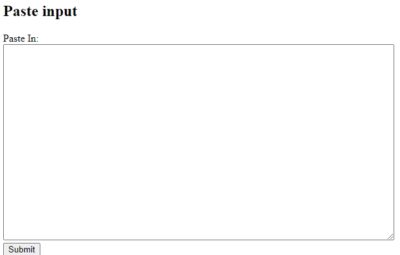
The code is below. Essentially just a textarea box with some javascript to ensure HTML isn’t stripped as it usually would be.
input.php
<!DOCTYPE html>
<!-- DJB Dec 2023 -->
<meta http-equiv="Content-Type" content="text/html;charset=utf-8" />
<html>
<body>

<!-- catch pastes and ensure the HTML isn't stripped -->
<script>
    document.addEventListener('paste', function(e) {
        e.preventDefault();
        var pastedText = ''
        pastedText = e.clipboardData.getData('text/html');
        document.getElementById('pastein').innerHTML = pastedText
    });
</script>
<h2>Paste input</h2>

<form action="/cgi-bin/parse.py" method="POST">
  <label for="pastein">Paste In:</label><br>
  <textarea id="pastein" name="pastein" rows="20" cols="80">
  </textarea>
  <br>
  <input type="submit" value="Submit">
</form>
<br><br><p>To clear the box, please refresh the page.</p>

</body>
</html>
Python first stage parser
This needn’t be Python code of course and would be more elegant as one parsing program but I wanted to do it this way to play with some of the python functionality. The input form posts to /cgi-bin/parse.py (privs for the program need to be set to 755).
It passes its ‘work in progress’ content data as a flat file to the final parsing step which is executed by clicking on a link displayed. However, the link is probably not seen as it is autoclicked by javascript so it ‘feels’ like one seamless program.
parse.py
#!/usr/bin/python
# DJB Dec 2023
# Receive HTML paste of transcription text and parse it using semicolon as the delimeter
# writing to flat file content.txt
print "Content-type: text/html\n\n"

import cgi, re, sys, os.path
from sys import platform

def remove_html_tags(text):
  inside_tag = False
  add_delim = False
  result = ''
  for char in text:
    if char == '<':
      inside_tag = True
      if add_delim:
        result += ";"
        add_delim = False
    elif char == '>':
      inside_tag = False
    else:
      if not inside_tag:
        add_delim = True
        result += char
  return result

def remove_non_ascii(text):
    return re.sub(r'[^\x00-\x7F]', ' ', text)

# RUN
# Read in paste from input form
form = cgi.FieldStorage()
if form.getvalue('pastein'):
    content = form.getvalue('pastein')
else:
    content = "No paste received"

# Debugging - write paste out to a file
#f = open("paste.txt", "w")
#f.write(content)
#f.close()
####

# remove oddball characters
regex = re.compile('[^a-zA-Z0-9,.<>#] ')
content = regex.sub('', content)
# top and tail to just get table rows
content =  content[content.find("<tr"):len(content)]
content =  content[0:content.find('/tbody')-1]
# clean up
content = remove_html_tags(content).strip()
content = remove_non_ascii(content).strip()
#Move content into a list
contentlist = []
contentlist = content.split(';')

#if platform == "linux":    #ie. RPi
#  for x in range(len(contentlist)):
#      print(contentlist[x],end="")
#      if x % 2 == 1:
#        print(" ")
#if platform == "linux2":   # ie Apache etc
#  for x in range(len(contentlist)):
#      print(contentlist[x])
#      if x % 2 == 1:
#        print("<br>")

# Write the parsed content string out to flat file for PHP read
f = open("content.txt", "w")
f.write(content)
f.close()
####

print('<a id=nextstep href="../output.php">Click to process</a>')

print('<script>window.onload=function(){document.getElementById("nextstep").click();};</script>')
PHP second stage parser
This is standard PHP. It reads in the ‘work in progress’ content data, together with the Data Items and Values tables from SQL and processes all the data in multidimensional arrays.
output.php
<html>
<head>
<title>
Output
</title>
</head>
<body>
<?php
// DJB Dec 2023
// Read in Categories and Places tables into multidimension arrays
// Read in initially parsed HTML screen scrape into 1D contents array (category||value)
session_cache_limiter('private');
// Connect to database
require 'phpgen_settings.php';
$res = GetGlobalConnectionOptions();
$dsn = "mysql:host=".$res['server'].";dbname=".$res['database'].";charset=utf8;port=".$res['port'];
$options = [
PDO::ATTR_EMULATE_PREPARES => false, // Disable emulation mode for "real" prepared statements
PDO::ATTR_ERRMODE => PDO::ERRMODE_EXCEPTION, // Disable errors in the form of exceptions
PDO::ATTR_DEFAULT_FETCH_MODE => PDO::FETCH_ASSOC, // Make the default fetch be an associative array
];
try {
$pdo = new PDO($dsn, $res['username'], $res['password'], $options);
if ($pdo) {
#echo "Connected successfully!<br>";
}
} catch (PDOException $e) {
echo $e->getMessage();die();
}
// Read Categories table into multidimension array categories(fromtext, totext, priority)
$stmt = $pdo->query("SELECT replace(rtrim(`fromtext`),'?',''),`totext`,`priority` FROM `j23-categories`"); // Singlequotes are for values, backticks for table/column-names
$categories = $stmt->fetchAll(PDO::FETCH_NUM);
// Read Places table into multidimension array places(fromtext, totext)
$stmt = $pdo->query("SELECT `fromtext`,`totext` FROM `j23-places`");
$places = $stmt->fetchAll(PDO::FETCH_NUM);
// Read content file as a string
$contentstring = file_get_contents(__DIR__. '/cgi-bin/content.txt');
// parse content splitting by semicolon into array contents(category||value)
$contents = explode(";",$contentstring);
// initialise output array
$output = [];
// process each element of the contents array which could be a category or a value
// (categories are even elements and values are odd elements)
for ($x = 0; $x < count($contents); $x++) {
if ($x == 0 || $x % 2 == 0) { /* even = fromtext */
$from = $contents[$x];
}
else { /* odd = value */
$searchValue = rtrim($from);
// check if the contents category is found in the categories array
$key = array_search($searchValue, array_column($categories, 0));
if (!empty($key) || $key === 0) {
// contents category found and so push category newtext and other items into
// 3D subarray of priority,totext,value
array_push($output, array($categories[$key][2],$categories[$key][1],$contents[$x]));
}
$from = "";
$searchValue = "";
}
}
// sort output array by categories.priority which is 1st element in the subarray
$key_values = array_column($output, 0);
array_multisort($key_values, SORT_ASC, $output);
$lastcat = "";
// Loop through output array
for($x = 0; $x < count($output); $x++){
$OutputCat = $output[$x]['1'];
$OutputVal = $output[$x]['2'];
$NewOutVal = "";
// Assemble category and value pair
// Check if value has a substring which is found in the places array and
// if found replace the value with the corrected place value
foreach ($places as $valuePlaces) {
$PlacesFromtext = $valuePlaces[0];
$PlacesTotext = $valuePlaces[1];
if (strpos($OutputVal, $PlacesFromtext) !== false) {
$NewOutVal = str_replace($PlacesFromtext,$PlacesTotext,$OutputVal);
}
}
// Check if duplicate OutputCats and if so ignore lower priority ones.
if ($OutputCat != $lastcat) {
// Print a category, value pair
// if the value has been corrected print that instead
if (strlen($NewOutVal) > 0) {
echo $OutputCat.$NewOutVal;
} else {
echo $OutputCat.$OutputVal;
}
// unless last element of output array print a semicolon after the category, value pair
if ($x < count($output)-1) {
echo "; ";
}
}
$lastcat = $OutputCat;
}
?>
<style>
button, input {
background-color: rgb(240, 240, 240);
color: black;
padding: 14px 25px;
text-align: center;
text-decoration: none;
font-weight: bold;
display: inline-block;
border: 1px solid #333333;
</style>
<p> </p>
<input type="button" id="myBtn" value="Return to input" onfocus="window.location.href = 'https://play.squirrelhouse.biz/input.php';">
<script>
document.addEventListener("keypress", function(event) {
if (event.keyCode === 13) {
event.preventDefault();
document.getElementById("myBtn").focus();
document.getElementById("myBtn").click();
}
});
</script>
</body>
</html>
The fully processed output is shown below. It has been abbreviated, corrected and reordered based on the MySQL data.
