
My FT-747GX has few DX catching features but it can still work well for FT8 however and so it has come out of retirement to fulfill that role. For a couple of years or so I had used an Intel i3 laptop on Windows 10 to run WSJT-X and LOG4OM through either this FT-747GX or my FT-990.
I covered WSJT-X in detail in my earlier post:-
WSJT-X on Windows or Linux?
Thinking I better accept Microsoft’s Windows 10 to 11 upgrade for my radio laptop I went ahead – stupid mistake! I tried and tried to get the FTDI driver to work on Windows 11 (as it had on Windows 10) but couldn’t so I thought…I’ll click on the link to back out of Windows 11 back to 10. That of course didn’t work and left me with a laptop that wouldn’t go forwards or backwards! 🤬
Life’s too short to waste it on Windows so I wiped the laptop and installed Linux Mint Cinnamon 22.1 instead. I downloaded the Mint install file on another PC and then used Etcher to write the ISO file onto a USB stick. I then booted the USB stick on my radio laptop and it ran Mint Live giving the option to install it which I did. Had I thought about it longer I might have formatted the hard drive with EXT4 instead of FAT but never mind. Linux Mint also has Xfce version which is very stripped down and suitable for use on older PCs. I didn’t try it but would have if I hadn’t thought I might want to use the laptop for other purposes too.
Linux Mint
Mint Cinnamon 22.1 was easy to install and if you’re familiar with Linux desktops everything is fairly easy to find. Cinnamon comes with Libre Office suite and other toys as standard too.
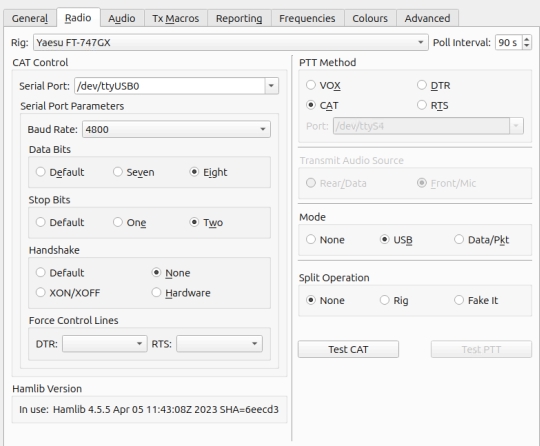
I followed path: Menu > Administration > Software Manager and entered WSJTX to install WSJT-X – no problems. In Settings, I picked Yaesu FT-747GX as the rig and plugged the CAT FTDI cable into the laptop. Serial port /dev/ttyUSB0 worked first time and all I changed was the poll interval to 90s.
QLog
A real annoyance was that my logger LOG4OM wouldn’t install, even via Wine. I decided to give QLog a go via path: Menu > Administration > Software Manager and entered “QLog”.
I was pleasantly surprised. QLog uses a SQLite database and looks up callsigns from QRZ. Integration with WSJTX was easy. I missed some of LOG4OMs features at first like Lazylog and Log webpage creation. QLog has its own advantages however and I like it now.
I installed RealVNC Server on this laptop with RealVNC Viewer on another PC (with a bigger screen) so that I could more comfortably use WSJT-X. RealVNC has a Lite license for personal use and works well.
So far, ditching Windows has been a very positive experience. Linux Mint runs so much quicker…
FT-747GX FT8 transmission set-up
I used the AF output socket on the back panel for the WSJT-X “receive” audio and fed in audio into the mic socket.
Twenty years ago I needed to run the FT-747 at very lower power in SSB to feed into a 6m transverter and so disconnected the ALC diode D99. The diode sits underneath the Filter daughter board which has pin connectors on its front and back sides and has a securing and grounding screw on the front right hand corner, and a plastic post on the back left hand corner. I realised that I had no idea whether I was overmodulating in FT8 and it would benefit from re-enabling the ALC and so I reconnected diode D99. The FT-747GX is now back to spec and so in sideband modes the Drive control is disabled and Mic Gain is the only output control on the radio.
I had some erratic results after reconnecting the ALC diode which lead me to make various changes but it is now stable and predictable:-
- Made an ALC damper within a RCA Phono plug which is plugged into the EXT ALC socket. It is simply a 0.1µF ceramic disc (for RF) and a 10µF electrolytic neg to ground (for thermal drift) both in parallel.

- Type 31 Ferrite Clamps on both ends of the “transmit” audio lead from PC to Mic plug. Also on the CAT lead and the serial lead to my Ciro Mazzoni ATU2. I have a program that runs on the PC to sync the WSJT-X frequency to the Ciro Mazzoni ATU2 as FT-747 CAT is too old to do that as well as WSJT-X!
- In WSJT-X I ticked the remember band power levels for (1) transmit and (2) tune
- Having more problems with fluctuating power levels. It seems some of this is due to the laptop audio software. I found some changes worked:-
- WSJT-X Audio Soundcard settings set to “pipewire”
- In Terminal I set soundcard output to a set level: wpctl set-volume @DEFAULT_AUDIO_SINK@ 0.50
I automated this within the sync program for convenience in case it had changed between reboots. - FT-747GX Mic Gain set to 8 o’clock. This seemed very low but it stops the mic amplifier being overpowered.
- The WSJT-X power slider is now in sole control of the RF output level
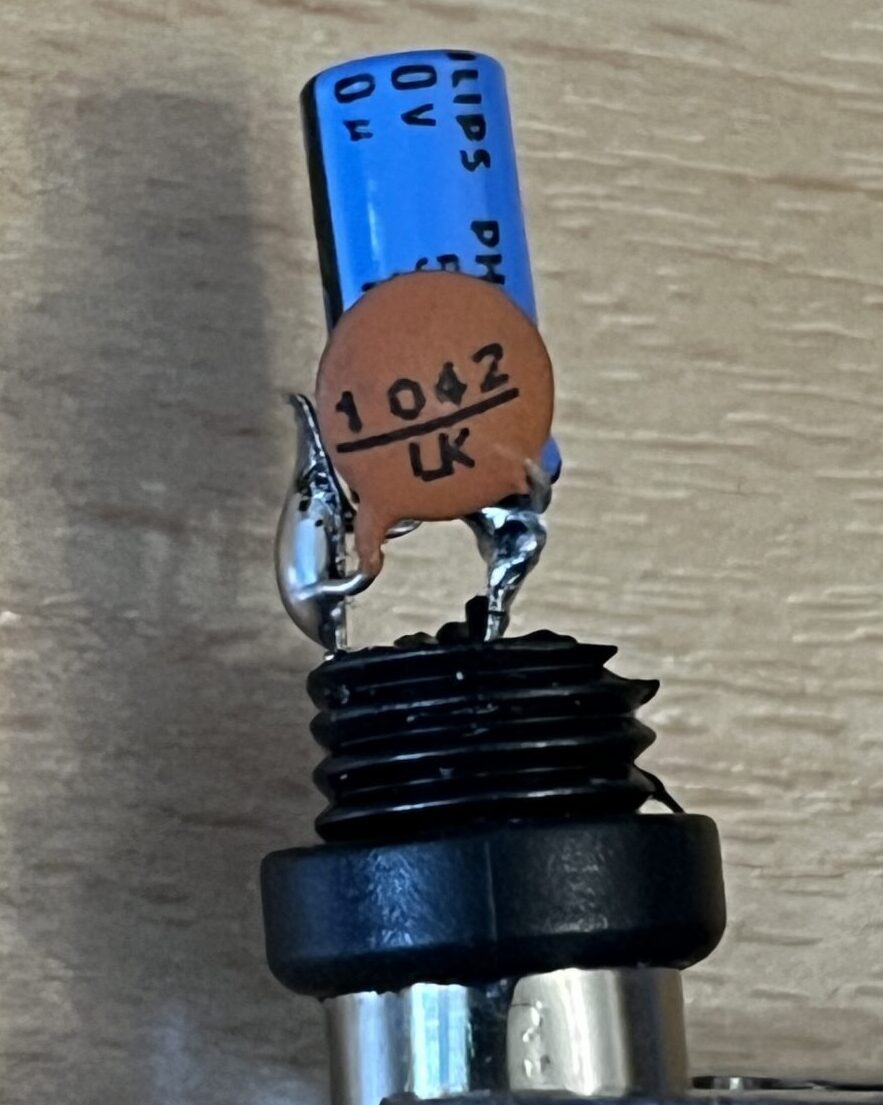
It isn’t perfect as there is some thermal power drift but that is to be expected from a near 40 year old radio with aging components. RF output is now much more stable and predictable and I can do band changes without having to recalibrate and continually trim controls.
The proof of its reasonable stability was when I was trying to work 3Y0K Bouvet Island, the most southerly island in the Atlantic. I was running WSJT-Z in pounce mode and after about an hour of calling in the pile-up, I nipped out of the shack for 2 minutes to get a cup of tea. I returned to find the FT-747GX had completed a QSO with the DXperdition station! Throughout that time power had stayed within reasonable limits of around 18 – 25 watts. Whilst FT8 is SSB its duty cycle is very heavy so 25 watts is a sensible power level for sustained use.
Notes
QLog location:-
/home/~/.var/app/io.github.foldynl.QLog/data/hamradio/QLog/qlog.db