Continuing on my mission to deliver a fast ecommerce site I set about to create a fade slider which didn’t require JQuery support.
In my application I’m using it in WordPress but it would run standalone if needed. I’m also using a Litespeed server with page caching.
Most sliders available are brimming with bells and whistles but they cost dearly in terms of website payload and JQuery is a huge pill for your browser to swallow!
That said, my target website uses Woocommerce which requires JQuery, and by using a slider that doesn’t require it, I can load JQuery with ‘defer’. Defer tells the browser not to wait for the script. Instead, the browser will continue to process the HTML, build DOM. The script loads “in the background”, and then runs when the DOM is fully built.
If using the Slider as a shortcode within WordPress, modify and add the following code in your child theme’s Functions.php. This code assumes that your shortcode will be [djbslider] and that you are using the GeneratePress theme so just modify it to your needs.
/* Include djbslider via shortcode eg. [djbslider] */
function show_djbslider($atts) {
// template dir is parent theme
  $filename = dirname(get_template_directory(), 1).'/generatepress_child/djbslider/djbslider.php';
//
  ob_start();
  include($filename);
  $sidebar= ob_get_contents();
  ob_end_clean();
  return $sidebar;
}
add_shortcode( 'djbslider', 'show_djbslider' );
Create a subfolder of your child theme as below

Now create djbslider.php within the djbslider folder you have just created and paste in the following code. You will need to change some of the settings of course from my example. I’ve picked srcset sizes to match the most likely breakpoints:-
1920px (this covers FullHD screens and up)
1600px (this will cover 1600px desktops and several tablets in portrait mode, for example iPads at 768px width, which will request a 2x image of 1536px and above)
1366px (it is the most widespread desktop resolution)
1024px (1024×768 screens, excluding iPads which are hi-density anyway)
768px (useful for 2x 375px mobile screens, as well as any device actually requesting 768px or thereabouts)
640px (for smartphones)
480px (for tiny screens)
In my example, my slides are twice as wide as they are high and so my image heights relate to those dimensions.
I experimented using two original images at 2880x1440px; a colour version and a monochrome version of the same image. I created resized images at all the various sizes manually for my test.
-2880x1440, -1920x960, -1366x683, -1024x512, -768x384, -640x320, -480x240I uploaded the image files to the djbslider folder, so image filenames were like
bottle-on-a-wall-768×384.jpg
bottle-on-a-wall-bw-768×384.jpg
etc.
In my example, my slides are twice as wide as they are high and so the image heights relate to that.
I’m showing 4 slides with fade and so I’m providing four filenames like bottle-on-a-wall and then adding the dimensions to the filename. To add more slides alter the $slides, add more elements to the arrays and extend the repeating php image block appropriately.
Animation is controlled by css.
Fading is controlled by css and javascript.
Resizing the slider (eg. switching your smartphone from portrait to landscape mode) is controlled by the javascript at the bottom.
<?php if ( ! defined( 'ABSPATH' ) ) { die( 'Invalid request.' ); }
/*
    Very lightweight Slider using css and javascript but not jquery
    Author: David, Squirrelhouse Consulting Ltd - 2020
    Based on many inputs but I started here https://www.the-art-of-web.com/css/fading-slideshow-no-jquery/

    Assumptions:-
    (1) slider is twice as wide as high and images are in these sizes and this is the filename suffix used
    -2880x1440, -1920x960, -1366x683, -1024x512, -768x384, -640x320, -480x240
    (2) images are jpg
    (3) images are stored in theme/djbslider folder rather than uploads because of the specific srcset sizes
    (4) slider is full width header. If within content, stage div needs  class="entry-content"

*/
$height6 = '1440' ;
$height5 = '960' ;
$height4 = '683' ;
$height3 = '512' ;
$height2 = '384' ; /* fallback size 768x384 */
$height1 = '320' ;
$height0 = '240' ;
$slidesdir = '/wp-content/themes/generatepress_child/djbslider/'  /* '/wp-content/uploads/' */;
$slides = 4;
$slide = array(
    "bottle-on-a-wall",
    "bottle-on-a-wall-bw",
    "bottle-on-a-wall",
    "bottle-on-a-wall-bw",
);
$slidealt = array(
    "bottle on a wall 1",
    "bottle on a wall 2",
    "bottle on a wall 3",
    "bottle on a wall 4",
);
$imgindex = 0;
?>
<style type="text/css">
#stage {
    display: block;
    position: relative;
    z-index: -1;
  }
  #stage img {
    position: absolute;
    z-index: -1;
  }
  #stage img:nth-of-type(1) {
    animation-name: fader;
    animation-delay: 10s;
    animation-duration: 1s;
    z-index: 20;
  }
  #stage img:nth-of-type(2) {
    z-index: 10;
  }
  #stage img:nth-of-type(n+3) {
    display: none;
  }
  @keyframes fader {
    from { opacity: 1.0; }
    to   { opacity: 0.0; }
  }
</style>

<div id="stage" class=""> <!-- class="entry-content" if not header -->
    <?php $imgindex = 0; $image = $slidesdir.$slide[$imgindex];?>
    <img class="stage-img" srcset="
        <?php echo $image.'-2880x'.$height6.'.jpg' ?> 2880w,
        <?php echo $image.'-1920x'.$height5.'.jpg' ?> 1920w,
        <?php echo $image.'-1366x'.$height4.'.jpg' ?> 1366w,
        <?php echo $image.'-1024x'.$height3.'.jpg' ?> 1024w,
        <?php echo $image.'-768x'.$height2.'.jpg' ?> 768w,
        <?php echo $image.'-640x'.$height1.'.jpg' ?> 640w,
        <?php echo $image.'-480x'.$height0.'.jpg' ?> 480w"
        src="<?php echo $image.'-768x'.$height2.'.jpg' ?>"
	    alt="<?php echo $slidealt[$imgindex] ?>" title="<?php echo $slidealt[$imgindex] ?>" />
    <?php $imgindex = 1; $image = $slidesdir.$slide[$imgindex];?>
    <img class="stage-img" srcset="
        <?php echo $image.'-2880x'.$height6.'.jpg' ?> 2880w,
        <?php echo $image.'-1920x'.$height5.'.jpg' ?> 1920w,
        <?php echo $image.'-1366x'.$height4.'.jpg' ?> 1366w,
        <?php echo $image.'-1024x'.$height3.'.jpg' ?> 1024w,
        <?php echo $image.'-768x'.$height2.'.jpg' ?> 768w,
        <?php echo $image.'-640x'.$height1.'.jpg' ?> 640w,
        <?php echo $image.'-480x'.$height0.'.jpg' ?> 480w"
        src="<?php echo $image.'-768x'.$height2.'.jpg' ?>"
	    alt="<?php echo $slidealt[$imgindex] ?>" title="<?php echo $slidealt[$imgindex] ?>" />
    <?php $imgindex = 2; $image = $slidesdir.$slide[$imgindex];?>
    <img class="stage-img" srcset="
        <?php echo $image.'-2880x'.$height6.'.jpg' ?> 2880w,
        <?php echo $image.'-1920x'.$height5.'.jpg' ?> 1920w,
        <?php echo $image.'-1366x'.$height4.'.jpg' ?> 1366w,
        <?php echo $image.'-1024x'.$height3.'.jpg' ?> 1024w,
        <?php echo $image.'-768x'.$height2.'.jpg' ?> 768w,
        <?php echo $image.'-640x'.$height1.'.jpg' ?> 640w,
        <?php echo $image.'-480x'.$height0.'.jpg' ?> 480w"
        src="<?php echo $image.'-768x'.$height2.'.jpg' ?>"
	    alt="<?php echo $slidealt[$imgindex] ?>" title="<?php echo $slidealt[$imgindex] ?>" />
    <?php $imgindex = 3; $image = $slidesdir.$slide[$imgindex];?>
    <img class="stage-img" srcset="
        <?php echo $image.'-2880x'.$height6.'.jpg' ?> 2880w,
        <?php echo $image.'-1920x'.$height5.'.jpg' ?> 1920w,
        <?php echo $image.'-1366x'.$height4.'.jpg' ?> 1366w,
        <?php echo $image.'-1024x'.$height3.'.jpg' ?> 1024w,
        <?php echo $image.'-768x'.$height2.'.jpg' ?> 768w,
        <?php echo $image.'-640x'.$height1.'.jpg' ?> 640w,
        <?php echo $image.'-480x'.$height0.'.jpg' ?> 480w"
        src="<?php echo $image.'-768x'.$height2.'.jpg' ?>"
	    alt="<?php echo $slidealt[$imgindex] ?>" title="<?php echo $slidealt[$imgindex] ?>" />
</div>
<script type="text/javascript">
// Script by DJB
  window.onload = function() {
    // fade animation
    var stage = document.getElementById("stage");
    var fadeComplete = function(e) { stage.appendChild(arr[0]); };
    var arr = stage.getElementsByTagName("img");
    for(var i=0; i < arr.length; i++) {
      arr[i].addEventListener("animationend", fadeComplete, false);
    }
    // size stage div dependent upon stage-img size
    document.getElementsByClassName('stage-img')[0].style.width = '100%';
    document.getElementsByClassName('stage-img')[0].style.height = 'auto';
    var img = document.getElementsByClassName('stage-img')[0];
    var stageHeight = img.clientWidth * 2 / <?php echo $slides ?>; // dimension ratio divided by slides
    document.getElementById('stage').style.height = stageHeight+'px';
    document.getElementsByClassName('stage-img')[0].style.height = stageHeight+'px';
  };

  window.onresize = function() {
    // size stage div dependent upon stage-img size
    document.getElementsByClassName('stage-img')[0].style.width = '100%';
    document.getElementsByClassName('stage-img')[0].style.height = 'auto';
    var img = document.getElementsByClassName('stage-img')[0];
    var stageHeight = img.clientWidth * 2 / <?php echo $slides ?>; // dimension ratio divided by slides
    document.getElementById('stage').style.height = stageHeight+'px';
    document.getElementsByClassName('stage-img')[0].style.height = stageHeight+'px';
  };

</script>
To change the slider to different dimensions, alter the PHP height variables and amend the two js code assignments that look like this…
var stageHeight = img.clientWidth * 2 / <?php echo $slides ?>; // dimension ratio divided by slides
Google Chrome Lighthouse Performance Results
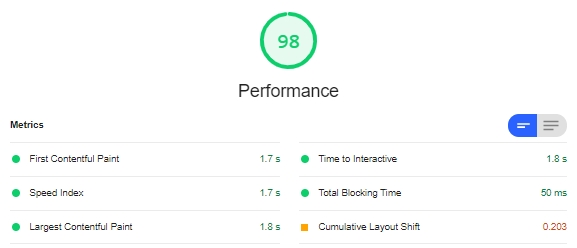
The Cumulative Layout Shift isn’t bad but it isn’t a green light either. This is typical of responsive sliders as there has to be interaction with the visitor’s browser before it is clear what the dimensions of the slider need to be. In fairness the fast response of this slider makes this layout shift of negligible consequence.